
Home Assistant: What’s new in AIO Energy Management 0.5.0 – 0.8.0
AIO Energy Management has got a few updates in the last half a month without having the ‘what’s new’ post written up. Nothing major, but the latest 0.8.0 is having some drastic changes that will (hopefully) help people configuring the integration more easily.
v0.5.0
This release was truly a major one – support to new 15 min MTU was added. When Nord Pool finally moved to support 15min MTU, I had to implement it to the AIO Energy Management as well obviously 🙂
To set the 15min mtu in use, just set variable ‘mtu: 15’. If omitted, 60min is used by default. (example below of 15min mtu)
aio_energy_management:
    cheapest_hours:
      - nordpool_official_config_entry: 01K4QBH1H606SDS1V28KGR32K7
        unique_id: cheapest_hours_mtu_15
        name: Cheapest Hours MTU 15
        first_hour: 21
        last_hour: 12
        mtu: 15
        starting_today: true
        number_of_hours: 6
        sequential: false
        failsafe_starting_hour: 1
Another big addition was price_modifications. While I made the official Nord Pool integration support to AIO Energy Management I noticed that the prices were always eur/mwh and no VAT could be added within the integration. The price_modidifications variable uses Jinja2 template variable where you can define whatever modifications to the prices before calculations. Want to do tariffs, add taxes or just convert to snt/kwh, now you can!
Some examples below, one where price is modified to snt/kwh and adding 25.5% VAT. Second with night tariff included
aio_energy_management:
    cheapest_hours:
      - nordpool_official_config_entry: 01K4QBH1H606SDS1V28KGR32K7
        unique_id: cheapest_hours_water_boiler
        name: Cheapest Hours Water Boiler
        first_hour: 21
        last_hour: 12
        starting_today: true
        number_of_hours: 6
        sequential: false
        failsafe_starting_hour: 1
        price_modifications: >
          {%- set as_snt = price / 10.0 %}
          {%- set with_taxes = (as_snt * 1.255) | float %}
          {{ with_taxes }}
      - nordpool_official_config_entry: 01K4QBH1H606SDS1V28KGR32K7
        unique_id: my_cheapest_hours_tariffs
        name: My Cheapest Hours With Tariffs
        first_hour: 21
        last_hour: 12
        starting_today: true
        number_of_slots: 3
        sequential: false
        failsafe_starting_hour: 1
        price_modifications: >
          {%- set as_snt = price / 10.0 %}
          {%- set with_taxes = (as_snt * 1.255) | float %}
          {%- if time.hour >= 22 or time.hour <= 7 %}
            {{ with_taxes + 3.1 }}
          {%- else %}
            {{ with_taxes + 5.0 }}
          {%- endif %}
v0.6.0
A long awaited feature was introduced with 0.6.0 – archive. Previously you only could see calendar values until data expired at the last hour of the sequence. Now you can set retention to keep them visible in calendar up to 365 days – just set retention_days configuration variable as you wish.
aio_energy_management:
    cheapest_hours:
      - nordpool_official_config_entry: 01K4QBH1H606SDS1V28KGR32K7
        unique_id: cheapest_hours_water_boiler
        name: Cheapest Hours Water Boiler
        first_hour: 21
        last_hour: 12
        starting_today: true
        number_of_hours: 6
        sequential: false
        retention_days: 30
This one also introduced the 15min MTU support to Entso-E configurations. Entso-e integration was a bit late for the launch of 15min mtu so I had to bring my part a bit late are well.
And last (and maybe the least) there were new configuration variable brought in – area. It’s possible to have multiple areas configured within the Nord Pool official integration and without this, only the first area on the list can be used with cheapest hours. Area can be configured with variable ‘area’ and is only effective with Nord Pool official integration. Area is the same visible in Nord Pool integration configuration page (e.g. SE1, SE2, FI…)
aio_energy_management:
    cheapest_hours:
      - nordpool_official_config_entry: 01K4QBH1H606SDS1V28KGR32K7
        unique_id: cheapest_hours_water_boiler
        name: Cheapest Hours Water Boiler
        first_hour: 21
        last_hour: 12
        starting_today: true
        number_of_hours: 6
        sequential: false
        area: FI
v0.7.0 (+v0.7.1)
In 0.7.1 release number_of_hours configuration was deprecated and number_of_slots was brought instead. While you can still use number_of_hours, I’d suggest to make the move to number_of_slots.
Number_of_slots will follow the value of selected MTU. If you are using 60min MTU and want to find two cheapest hours, set the number_of_slots to two. When using 15min MTU and if still looking for the two cheapest hours, this should be set to eight (8*15min = 2 hours).
This makes it easier to find for smaller amount of slots than one full hour for some (rare) use cases.
Examples below. First where two HOURS are selected with 15min MTU(number_of_slots -> 4 * 2 = 8), second where MTU is 60 and where two HOURS are selected (number_of_slots: 2).
aio_energy_management:
    cheapest_hours:
      - nordpool_official_config_entry: 01K4QBH1H606SDS1V28KGR32K7
        unique_id: cheapest_hours_mtu_15
        name: Cheapest Hours MTU 15
        first_hour: 0
        last_hour: 23
        mtu: 15
        starting_today: false
        number_of_slots: 8
        sequential: false
        failsafe_starting_hour: 1
      - nordpool_official_config_entry: 01K4QBH1H606SDS1V28KGR32K7
        unique_id: cheapest_hours_mtu_60
        name: Cheapest Hours MTU 60
        first_hour: 0
        last_hour: 23
        mtu: 60
        starting_today: false
        number_of_slots: 2
        sequential: false
        failsafe_starting_hour: 1
v0.8.0
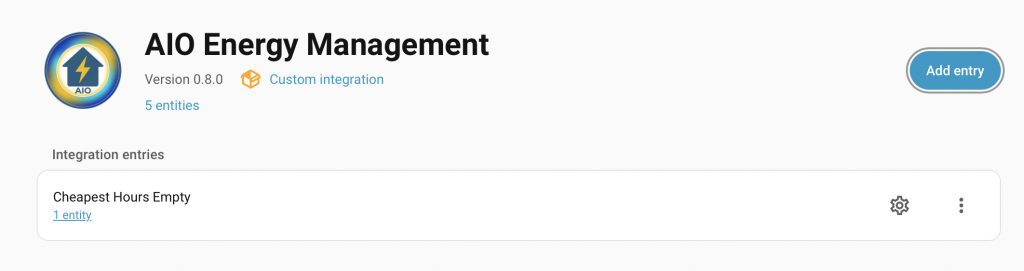
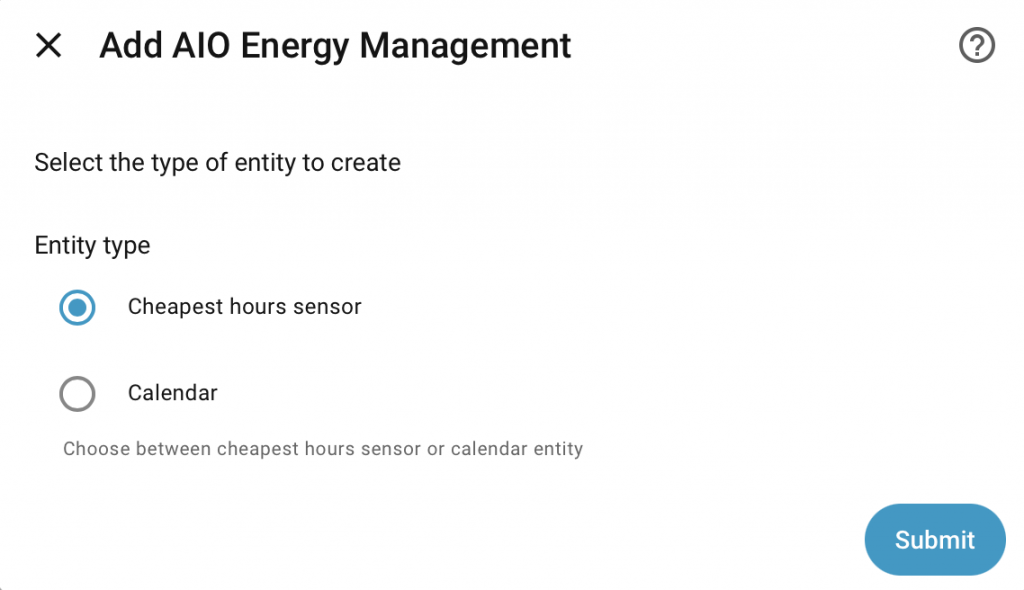
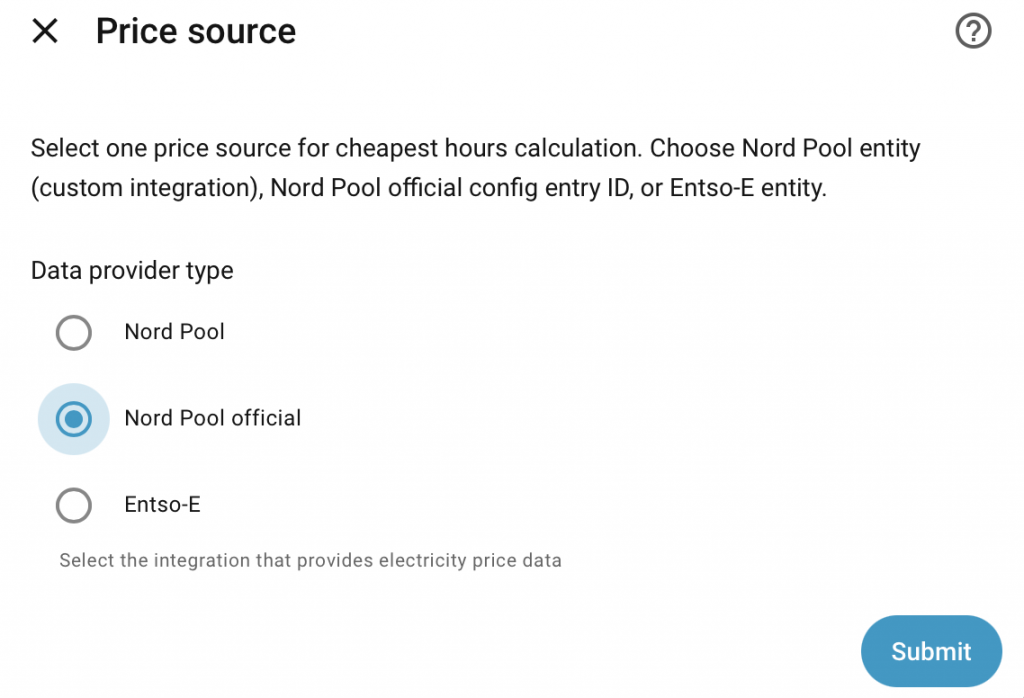
0.8.0 feature, config flow, is currently a Beta feature and this FINALLY brings a nice utility for users who struggle with the YAML configuration. Now it’s possible to set everything through the UI totally – of course it’s still possible to use YAML configuration if you wish to continue doing so.
All the configurations remain the same, so go and see references from the original GitHub project README.md. Just bear in mind that there’s this advanced ‘enable entities’ selection on the beginning on the configuration flow that is disabled by default. Enabling this allows you to select entities for certain configurations to be used as dynamic entities, rather than hard coded values (like number_of_slots and offsets).
Oh, and starting_today is now deprecated as it’s not necessary anymore. It will be determined automatically from the first_hour and the last_hour configurations. You still can provide it with YAML configuration (backward compatible), but it’s not necessary to do so.
Few tips when configuring through UI:
- Only one instance of calendar is allowed to made, but defining from the YAML and UI it can be defined twice – don’t do this though
- ‘Allow dynamic entities on configuration‘ is disabled by default and only static values can be added. Enabling this checkbox will allow you to define dynamic entities for certain items. This is to make it more easy for new users to make basic configurations.
- The entity data is cleared automatically when the configuration is edited through UI – please keep this in mind when experimenting -> no need to call clear_data from AIO Energy Management service.
- The config flow still might have bugs as this feature is on beta, please report them at the GitHub project page!
For detailed configuration flow usage, check out the AIO Energy Management configuration flow guide!

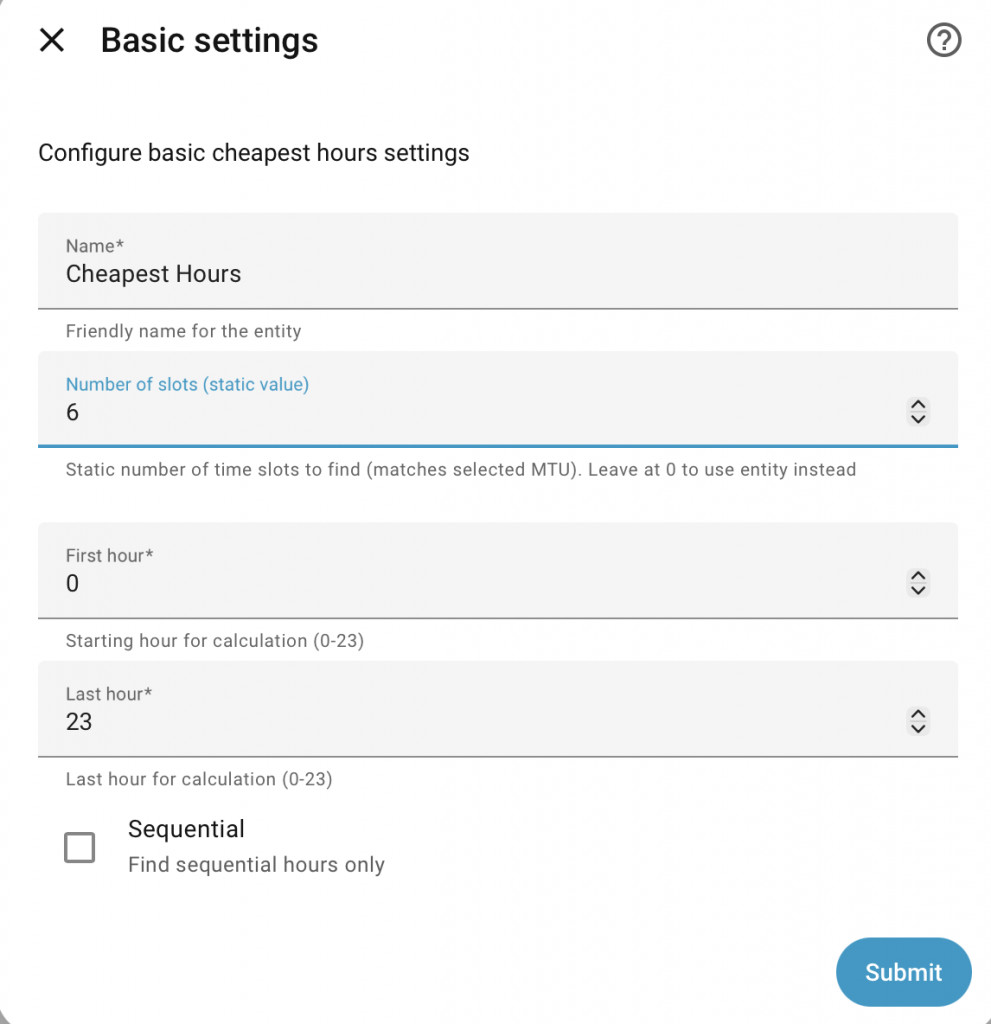
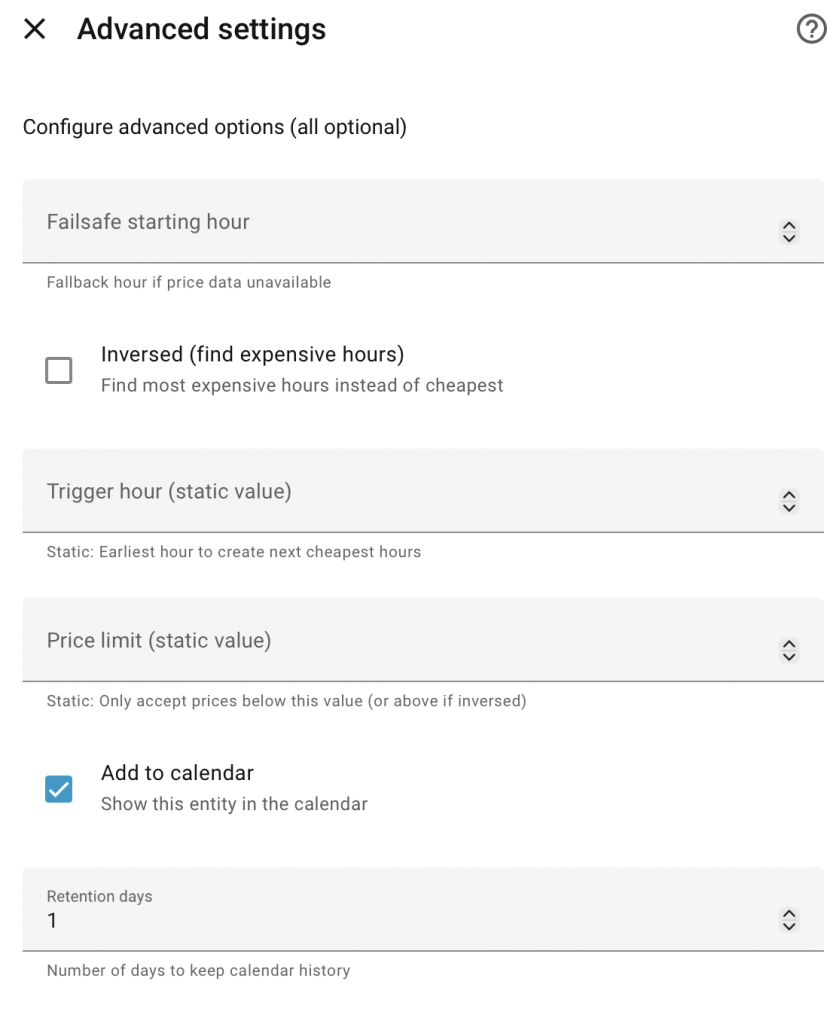
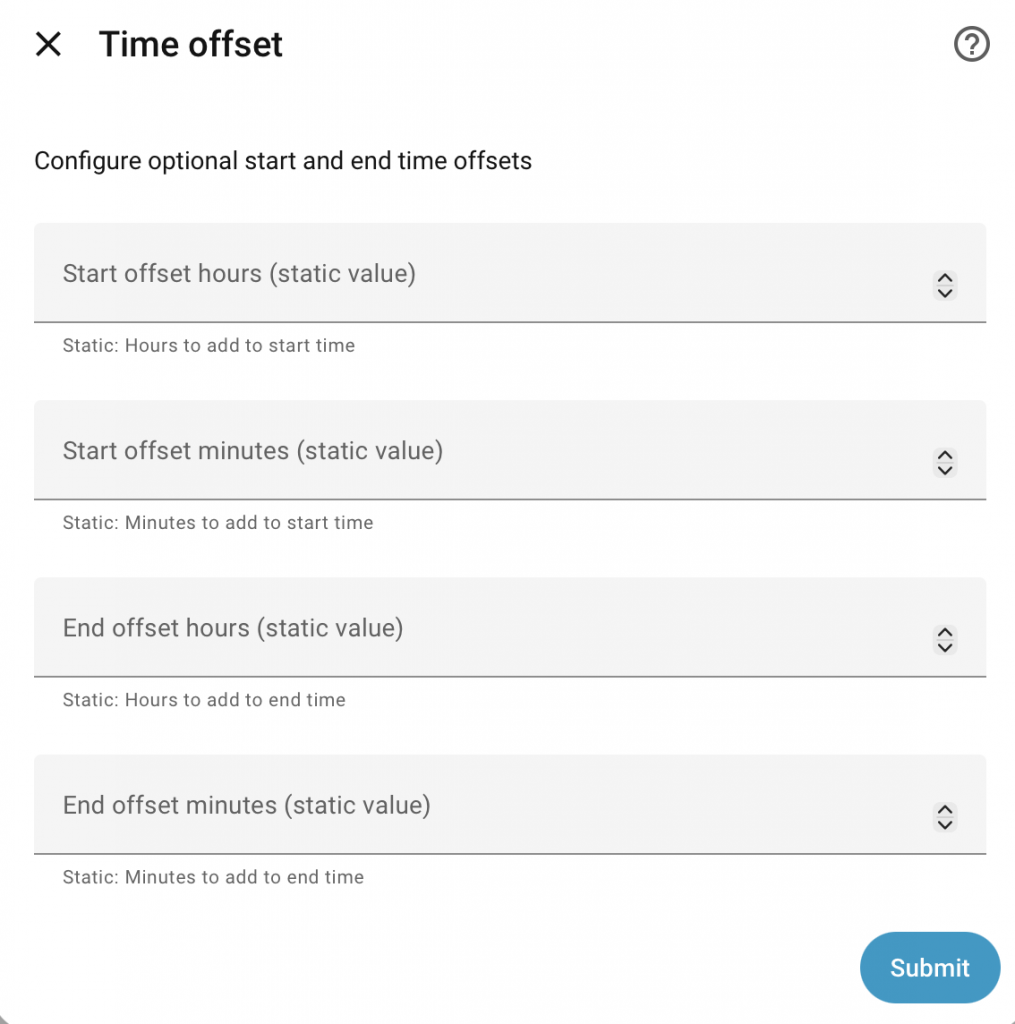
What the future holds…
I’m currently developing version 1.0.0 of AIO Energy Management, which finally brings support for excess solar management. This has been the original plan all along, but for one reason or another, I’ve been postponing it. The logic is now clear and the code is half done, so it should be ready in the next few months! It will be published as a beta first—probably for a month or two—to gather some real-world statistics while the sun is up.

Hi.
Great to see the UI option coming but after the latest update the aio energy management disappeared from devices & services. I have the old settings still in yaml and they work but I can’t modify them via UI because the Aio energy management disappeared from the devices & services list. If I understand correctly the old settings should show up in devices & services and modifying them in UI should be possible.
Yes, this is unfortunate setback of this upgrade.
However, there’s a workaround – create a one dummy cheapest hours from UI and you should see it again. The entities from YAML will be shown there as well.
edit: Obviously you can’t edit the YAML configured entities from UI though.
Hi. Just made all the cheapest and expensive hours, and calendar entity again via UI and deleted the yaml code so now I have all in the UI and can modify them there. Just had to modify the entity ID for the new ones after deleting the old yaml code because it added a number 2 in the end of the ID. Now all my old automations work wit the new UI made versions.
Awesome! Please let me know if you find any issues (or something to improve) with the config flow 🙂
Hello, thanks for all the hard work with creating this integration, have used it a long time now 🙂 after upgrading to newest Home Assistant, I noticed that AIO v0.8.0 is not compatible with newer Home Assistant / Python 3.13 due to incorrect type annotations (Boolean instead of bool).
UI error after creating sensor:
“The following integrations and platforms could not be set up: aio_energy_management.binary_sensor (Show logs) Please check your config and logs.”
Logs:
“Error while importing aio_energy_management binary_sensor platform
TypeError: unsupported operand type(s) for |: ‘function’ and ‘NoneType’
Traceback (most recent call last):
File “/config/custom_components/aio_energy_management/binary_sensor.py”, line 16, in
from .cheapest_hours_binary_sensor import CheapestHoursBinarySensor
File “/config/custom_components/aio_energy_management/cheapest_hours_binary_sensor.py”, line 52, in CheapestHoursBinarySensor
starting_today: Boolean | None
~~~~~~~~^~~~~~
TypeError: unsupported operand type(s) for |: ‘function’ and ‘NoneType’
During handling of the above exception:
ImportError: Exception importing custom_components.aio_energy_management.binary_sensor
Home Assistant failed to set up the aio_energy_management integration due to this error.”
From the errors in the Home Assistant, I noticed that these needed changing:
/config/custom_components/aio_energy_management/cheapest_hours_binary_sensor.py
“starting_today: Boolean | None” -> “starting_today: bool | None”
Boolean is not a Python type but a voluptuous validator function, so it cannot be used in type annotations. bool is the correct built-in type and works properly with union types in Python 3.10+. This aligns with the known distinction discussed here: https://github.com/alecthomas/voluptuous/issues/443
“from voluptuous import Boolean” -> removed
The import was unnecessary and led to incorrect use as a type. Boolean is a validator, not a type, so it should not be used in type hints. Removing the import prevents misuse and follows the same reasoning highlighted in the discussion above.
After these changes the UI configurations went smoothly without any errors. Now I have the problem that the calendar is still empty, which is also created. I have removed the old yaml files and the original AIO folder in the start, so there wouldnt be any overlaps. Should the calendar entries appear immediately or after the new NordPool prices are given each day at 2 pm? Or is there something else that is now broken with the changes?
Ah, you’re absolutely right here and looks like I’ve done some shitty code on this part 🙂
I’ll fix this and create a 0.8.1 hotfix release today.
About the configuration entries – the new entries will not appear until Nord Pool prices are out. Also please bear in mind that editing existing configuration through UI will clear the old calculations if done any for that specific entity.
edit: Fortunately the issue does not affect all environments.
The draft release of v0.8.1 is now ready. I will also wait until 2pm to see everything still works.
If everything goes ok, I’ll publish the release straight away.
Hi, thanks for the quick fix, updated it without issues in the HA. Also the calendar entries are working normally now when i switched to the official NordPool integration, was earlier trying to tell the prices via custom sensor.
“starting_today is now deprecated as it’s not necessary anymore. It will be determined automatically from the first_hour and the last_hour configurations”
Hoiw is that calculated?